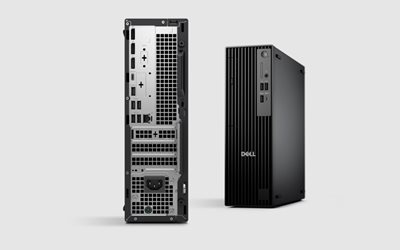
The Dell Pro Slim QCS1250 is Dell’s next-generation Small Form Factor (SFF) business desktop, engineered as a direct replacement for the older OptiPlex 3000, 5000, and 7000 series.
With improved thermals, enhanced power efficiency, and modern Intel/AMD processors, the QCS1250 is built for businesses needing reliable, long-lifecycle desktop hardware without the footprint of traditional tower PCs.
I rate this model as an excellent replacement choice for any organisation currently running pre-2022 OptiPlex units or planning a Windows 10 retirement hardware refresh.
Key Business Advantages
1. Modern Processing Power
Available with current-generation Intel or AMD business CPUs, delivering:
- Faster application load times
- Smooth multitasking
- Stronger security and firmware support
- Improved long-term reliability
Perfect for:
- Office applications
- Web-based business systems
- Accounting software
- Email, Teams, and communication platforms
- Multi-screen workloads
2. Compact & Professional “Pro Slim” Design
- Small footprint fits under monitors or behind displays
- Reduced heat and noise levels
- Tool-less chassis for easy maintenance
- Designed for corporate desks, kiosks, and hybrid workstations
3. Enhanced Security & IT Manageability
- TPM 2.0
- Secure Boot
- Dell BIOS protection features
- Optional SmartCard and facial-recognition modules
- Enterprise remote management support
These features ensure stable, secure, and manageable deployments across multiple offices or large user bases.
4. Modern Connectivity Options
Typical QCS1250 configurations include:
- USB-C and multiple USB-A ports
- DisplayPort and/or HDMI (varies by SKU)
- Optional Wi-Fi 6E
- RJ45 Gigabit Ethernet
- Dual SSD support (NVMe)
This provides flexibility for:
- Dual and triple monitor setups
- Docking station environments
- Hybrid users working between home and office
Recommended Configuration Options
Below are three well-balanced configurations depending on workload.
Option A: Standard Office Build
Best for: Email, spreadsheets, Teams, accounting, CRM, web apps.
Recommended Spec:
- Intel Core i5 or AMD Ryzen 5
- 16GB DDR5 RAM
- 256GB or 512GB NVMe SSD
- Integrated graphics
- Windows 11 Pro
Why this works:
Fast, efficient, and balanced for the majority of business users. Long lifecycle and low support overhead.
Option B: Business Power User Build
Best for: Heavy multitasking, large workbooks, multi-window workflows, dual-monitor setups.
Recommended Spec:
- Intel Core i7 or AMD Ryzen 7
- 32GB DDR5 RAM
- 512GB or 1TB NVMe SSD
- Integrated graphics
- Windows 11 Pro
Why this works:
Future-proofed for demanding workloads and users that run multiple business systems simultaneously.
Option C: Specialist / Developer / Creative Build
Best for: Developers, CAD-lite usage, analysts, users needing above-average performance.
Recommended Spec:
- Intel Core i7 or AMD Ryzen 7
- 32GB–64GB DDR5 RAM
- 1TB NVMe SSD
- Optional low-profile discrete GPU
- Windows 11 Pro
Why this works:
Handles high-performance tasks without requiring a full-tower workstation.
What the QCS1250 Replaces
The QCS1250 is the intended upgrade path for older Dell SFF models, including:
Replaces:
- OptiPlex 3000 Series SFF
- OptiPlex 5000 Series SFF
- OptiPlex 7000 Series SFF
- Older 3070 / 3080 / 5080 / 7080 desktops
Reasons to Upgrade
- Faster performance (CPU + DDR5 memory)
- Improved thermal efficiency
- Smaller footprint
- Stronger security compliance
- Longer manufacturer support lifecycle
- Lower power usage
- Designed for Windows 11
Professional Rating
9.2 / 10 – Strongly recommended for business environments.
Stable, compact, energy-efficient, and easily serviceable. Ideal for office refresh cycles, hybrid work, and organisations standardising on a consistent platform.