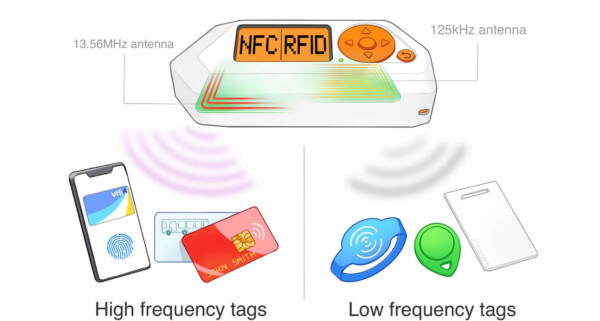
Flipper Zero RFID Guide, RFID on the Flipper Zero refers specifically to low-frequency 125 kHz RFID, which is different from NFC. This is one of the most common areas of confusion for new users. This guide explains exactly what RFID on the Flipper Zero does, how to use it correctly, and what extra hardware (if any) you need.
This guide assumes beginner-level knowledge.
What RFID on the Flipper Zero Is Used For
RFID (125 kHz) is typically found in:
Older office key fobs
Gym locker fobs
Basic access systems
Legacy door entry systems
Some parking or gate tags
With RFID, the Flipper Zero can:
Read low-frequency RFID tags
Identify the tag format
Save the tag data for reference
Help you understand whether a system is outdated
It does not bypass security or grant access.
RFID vs NFC (Critical Difference)
Many users assume all “cards” are RFID. They are not.
RFID (Flipper RFID menu):
• 125 kHz
• Older technology
• Usually key fobs, not flat cards
NFC (Flipper NFC menu):
• 13.56 MHz
• Modern cards
• Phones, payments, transport cards
If RFID does not work, try NFC before assuming failure.
What You Need to Use RFID
Required:
Flipper Zero only
Optional (for learning):
A known 125 kHz RFID fob (EM4100 / EM4102 type)
Blank compatible RFID tags (only for systems you own and are allowed to test)
You do not need:
Wi-Fi Dev Board
External antennas
Paid apps
Where the RFID Antenna Is Located
The RFID antenna is built into the back of the Flipper Zero, slightly lower than the NFC antenna.
For best results:
Press the fob flat against the back
Hold it still
Wait a few seconds
Do not move or swipe
RFID is slower than NFC and needs patience.
Step-by-Step: How to Read an RFID Tag
- From the main menu, select RFID
- Choose Read
- Press the RFID fob firmly against the back of the Flipper
- Hold still for 2–5 seconds
- Wait for detection
- Review the tag information
- Select Save if you want to store it
What you’ll typically see:
Tag type (e.g. EM4100, HID Prox)
ID number
Protocol format
How to Confirm RFID Is Working (Beginner Test)
To confirm your Flipper RFID works:
Use a known old key fob (not a modern card)
Hold it still against the back
Wait patiently
If it reads one known RFID fob, the device is working correctly.
What “Unsupported” or “Nothing Detected” Usually Means
This almost always means one of the following:
The card is NFC, not RFID
The card is encrypted or secure
The card uses a different frequency
The card is modern and protected
This is normal behaviour, not a fault.
Can You Copy or Emulate RFID Tags? (Reality Check)
The Flipper Zero can only copy or emulate:
Very old
Very simple
Unencrypted RFID tags
That you own or manage
Most modern access systems cannot be copied.
If the Flipper allows saving but not emulation, the system is likely secure.
Step-by-Step: Saving an RFID Tag
- Read the RFID tag
- Select Save
- Give it a clear name (for your reference)
- Store it in your files
Saved tags are mainly used for:
Learning
Comparison
Understanding security levels
Common RFID User Problems and Fixes
“RFID never works on any card”
• Most modern cards are NFC
• Try the NFC menu instead
“It reads but doesn’t let me do anything”
• The tag is read-only or secure
• This is expected
“It takes ages to detect”
• RFID is slow
• Hold still longer
• Try repositioning slightly
What You CANNOT Do With RFID
You cannot:
Open doors you don’t own
Bypass access systems
Clone secure fobs
Upgrade access permissions
Defeat encryption
If a system is secure, the Flipper will show that.
Best Beginner RFID Experiments
Safe ways to learn RFID:
Compare two different old key fobs
Compare RFID vs NFC cards
Identify which systems still use legacy RFID
Scan a fob and document what the Flipper shows
This builds understanding of access technology evolution.
Do You Need Any RFID Add-Ons?
Most users do not need anything extra.
Optional only if learning deeply:
A couple of old RFID fobs
Blank RFID tags (for permitted systems only)
Avoid buying large packs unless you know why you need them.
When RFID Is Not the Right Tool
If your goal involves:
Bank cards
Transport cards
Modern office badges
Hotel keys
Those are NFC or encrypted systems, not 125 kHz RFID.
Final Thoughts on RFID
RFID is less exciting than NFC, but extremely educational. It clearly shows how older access systems worked and why they are now considered insecure. Once you understand RFID, modern NFC security makes much more sense.
Next in the Series
The next logical deep dive is:
Flipper Zero Sub-GHz Guide: Step-by-Step, Supported Devices, and What Add-Ons You Need