Flipper Zero Sub-GHz Guide, Sub-GHz is the Flipper Zero feature that deals with wireless signals below 1 GHz. These signals are commonly used by household remotes, sensors, and older wireless devices. It is also the area with the most restrictions in modern firmware, which is why expectations need to be set correctly.
This guide explains exactly what Sub-GHz does in 2026, how to use it step by step, and what add-ons (if any) are actually worth buying.
What Sub-GHz on the Flipper Zero Is Used For
Sub-GHz is typically used by:
Wireless doorbells
Weather stations
Temperature and motion sensors
Remote-controlled sockets
Older garage and gate remotes
Alarm sensors (your own systems only)
With Sub-GHz, the Flipper Zero can:
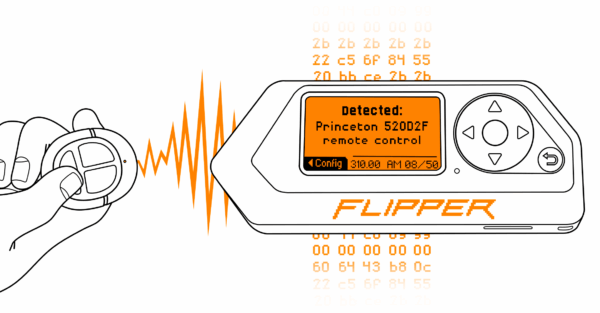
Detect Sub-GHz transmissions
Identify frequency and modulation
Show whether a signal is fixed or rolling code
Save supported signals for analysis
Help you understand why some systems are secure
It does not bypass encryption or modern security systems.
Very Important: Sub-GHz Expectations in 2026
In 2026 firmware:
Most modern remotes use rolling codes or encryption
Many signals can be detected but not saved
Some frequencies are blocked by region rules
This is normal and intentional.
If Sub-GHz feels “limited”, that usually means the device you are testing is secure.
What You Need to Use Sub-GHz
Required:
Flipper Zero only
Optional (advanced users only):
External Sub-GHz antenna (rarely needed)
You do not need:
Wi-Fi Dev Board
Paid firmware
Any illegal modifications
Most users never need extra hardware for Sub-GHz learning.
Before You Start: Check Region Settings (Critical)
Sub-GHz will not work correctly if your region is wrong.
Step-by-step:
- Open Sub-GHz
- Go to Settings
- Check your region (UK / EU / US as appropriate)
- Apply and restart if prompted
If Sub-GHz suddenly “stops working”, this is the first thing to check.
Step-by-Step: How to Scan a Sub-GHz Signal
- Open Sub-GHz
- Select Scan or Read
- Hold your remote or sensor 5–20 cm from the Flipper
- Press a button or trigger the sensor
- Watch the screen for detected signals
What you’ll typically see:
Frequency (e.g. 433.92 MHz)
Signal type
Rolling-code or fixed-code indication
Encrypted or unsupported notices
How to Confirm Sub-GHz Is Working (Beginner Test)
To confirm Sub-GHz works properly:
Use a simple device like:
• A wireless doorbell
• A cheap remote socket
• A weather sensor
If the Flipper detects frequency activity, Sub-GHz is functioning.
What “Rolling Code Detected” Means
This is one of the most common questions.
Rolling code means:
The signal changes every time
Replay is blocked
Security is working
The Flipper Zero will detect these signals but will not save or replay them.
This is expected behaviour.
What “Encrypted” or “Unsupported” Means
This means:
The system uses modern security
The Flipper cannot interact with it
The device is doing its job
It does not mean your Flipper is broken.
Step-by-Step: Saving a Supported Sub-GHz Signal
Only some signals can be saved.
- Scan a Sub-GHz device
- If the Flipper allows it, select Save
- Name the signal clearly
- Store it in your files
Saved signals are usually from very simple, fixed-code devices.
Why Most Garage and Car Remotes Do NOT Work
This is a common misunderstanding.
Modern systems use:
Rolling codes
Challenge-response encryption
Time-based security
The Flipper Zero cannot replay these, by design.
If a video claims otherwise, it is outdated or misleading.
Common Sub-GHz Problems and Fixes
“Nothing is detected”
• Check region settings
• Replace remote battery
• Increase distance slightly
• Move away from metal or cars
“It worked before an update”
• Region reset
• Power-saving enabled
• Restart required
“It detects but won’t save”
• Rolling code
• Encrypted system
• Expected behaviour
Best Beginner Sub-GHz Experiments
Safe and educational tests:
Compare two remotes (old vs new)
Compare a doorbell vs a garage remote
Observe rolling-code behaviour
Document which household devices still use fixed codes
This teaches more than replay ever would.
Do You Need a Better Antenna?
For most users: no.
External antennas:
Are for niche use
Add complexity
Often break region compliance
The built-in antenna is sufficient for learning.
When Sub-GHz Is Not the Right Tool
If your goal involves:
Cars
Modern garages
Smart locks
Commercial alarm systems
Those are intentionally protected and cannot be controlled.
Final Thoughts on Sub-GHz
Sub-GHz is the section that best demonstrates why modern security exists. It is less about control and more about understanding. Once you accept that, it becomes one of the most valuable learning tools on the Flipper Zero.
Next in the Series
The next deep dive is:
Flipper Zero Infrared (IR) Guide: Step-by-Step Universal Remote Setup