What Does the SFC Command Do?, The SFC command (System File Checker) scans Windows system files and repairs them if they are corrupted, missing, or altered.
SFC:
- Verifies critical Windows files
- Replaces damaged files automatically
- Uses a protected Windows cache
- Does not affect personal files
It is one of the most trusted Windows repair commands.
When Should You Use SFC?
Use SFC if:
- Windows crashes or freezes
- Apps fail to open
- System errors appear after updates
- Startup problems persist
- Files seem corrupted
SFC is often recommended after CHKDSK.
Basic SFC Command Syntax
The most common and recommended command is:
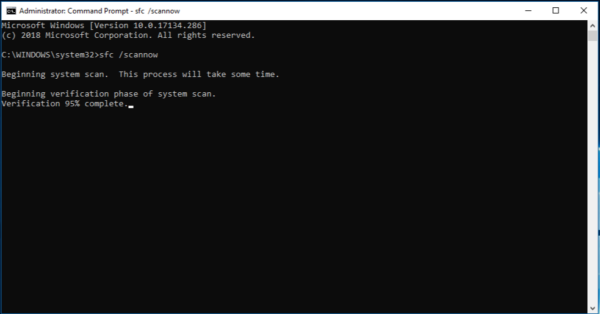
sfc /scannow
This:
- Scans all protected system files
- Repairs issues automatically
- Can take 10–30 minutes
How to Run SFC (Step by Step)
Steps:
- Open Command Prompt as Administrator
- Type:
sfc /scannow - Press Enter
- Wait for the scan to complete
Do not close Command Prompt while the scan is running.
Running SFC When Windows Will Not Start
From Windows Recovery Command Prompt:
sfc /scannow /offbootdir=C:\ /offwindir=C:\Windows
This tells Windows:
- Where the boot drive is
- Where Windows is installed
This method is commonly used in recovery environments.
Understanding SFC Results
“Windows Resource Protection did not find any integrity violations”
No problems were found.
“Windows Resource Protection found corrupt files and repaired them”
Problems were detected and fixed successfully.
Restart your PC after this message.
“Windows Resource Protection found corrupt files but was unable to fix some”
Some files could not be repaired.
Next steps:
- Restart and run SFC again
- Run DISM (advanced repair)
- Check Windows Update
Common SFC Problems
SFC Stops or Freezes
This can happen on damaged systems.
Solutions:
- Be patient (some scans take longer)
- Run SFC from recovery mode
- Run CHKDSK first
“You Must Be an Administrator”
SFC requires elevated permissions.
Solution:
- Reopen Command Prompt as Administrator
Is SFC Safe?
Yes.
SFC:
- Does not delete personal data
- Does not remove programs
- Only repairs protected system files
It is safe to run multiple times if needed.
SFC vs CHKDSK (Important Difference)
- SFC → repairs Windows system files
- CHKDSK → repairs disk and file system errors
They work together and are often run in this order:
- CHKDSK
- SFC
What to Learn After SFC
The next advanced but highly valuable topic is:
- DOS vs Command Prompt vs PowerShell
This helps users understand which tool to use next.
Where to Go Next
Recommended next guides: