Crypto Wallet Security Tips: How to Keep Your Cryptocurrency Safe
If you’ve started buying or holding crypto — whether it’s Bitcoin, Ethereum, or any other coin — you’re already ahead of the curve. But there’s one thing many people overlook: security.
Your crypto wallet is the key to everything you own in the blockchain world. If someone gets access to it, or if you lose your recovery details, your funds are gone — with no bank to call and no password reset link.
This guide covers essential crypto wallet security tips to help you protect your digital assets — from simple habits to advanced tools.
🧠 Quick Recap: What Is a Crypto Wallet?
Your crypto wallet doesn’t store coins — it stores your private keys. These are cryptographic keys that give you full control over your assets on the blockchain.
There are two main types of wallets:
| Wallet Type | Connection | Best For |
|---|---|---|
| Hot Wallets | Online (MetaMask, Trust Wallet) | Daily use, ease of access |
| Cold Wallets | Offline (Ledger, Trezor) | Long-term storage, high security |
🔍 Learn more: What Is a Crypto Wallet? Hot vs Cold Explained
⚠️ Why Security Matters More Than Ever
Crypto gives you full ownership — but also full responsibility. Unlike traditional banks or PayPal, you are your own bank. If your keys are lost or stolen, there’s no recovery.
Common threats include:
- Phishing scams
- Wallet-draining smart contracts
- Fake websites
- Malware or keyloggers
- Social engineering (scam DMs, fake support)
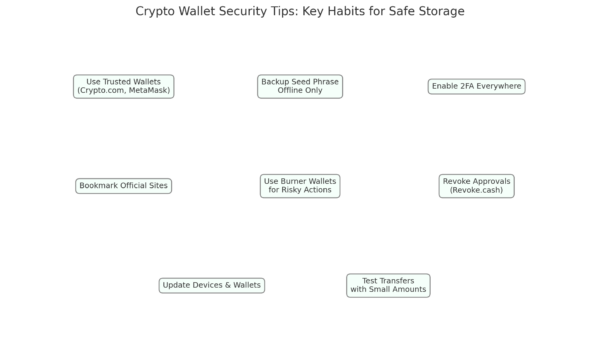
🛡️ Our Top Crypto Wallet Security Tips
✅ 1. Start with a Trusted Wallet
If you’re just starting out, use a trusted platform like Crypto.com — it’s beginner-friendly, UK-compatible, and offers built-in protections:
- 2FA for all logins
- App-specific withdrawal whitelists
- Device verification
- Solid UK onboarding experience
🧭 We personally use Crypto.com when starting out. It’s simple, secure, and great for buying, holding, or learning before moving to advanced wallets.
Once you’re ready to go deeper, consider a cold wallet like Ledger or Trezor.
✅ 2. Back Up Your Seed Phrase (and Store It Safely)
Your seed phrase (usually 12–24 words) is your ultimate backup. If your phone or computer dies — this phrase restores your wallet.
- Write it down physically (paper or metal)
- Store it in multiple offline locations
- Never share it or store it digitally (photos, cloud, email)
🚫 If someone has your seed phrase, they own your wallet.
✅ 3. Enable 2FA Everywhere
Always turn on two-factor authentication using an app like Google Authenticator or Authy — especially on:
- Exchange accounts (like Crypto.com)
- Wallet-connected emails
- Mobile apps used to manage crypto
Avoid SMS-based 2FA when possible — it’s vulnerable to SIM swap attacks.
✅ 4. Bookmark and Double-Check Every Site
Only interact with verified sites. Scammers create fake versions of popular platforms like MetaMask or OpenSea.
- Bookmark official wallet and DApp URLs
- Never click links from Twitter DMs, Discord messages, or random emails
- Check SSL certificates (🔒 in browser address bar)
✅ 5. Use a Burner Wallet for Risky Activities
Trying a new NFT mint or unfamiliar DApp? Use a separate wallet with a small amount of crypto. If something goes wrong, your main funds stay untouched.
✅ 6. Revoke Old Approvals
Some smart contracts you’ve interacted with still have permission to access your wallet.
Use Revoke.cash or Wallet Guard to:
- Review token approvals
- Remove access from old or risky contracts
✅ 7. Keep Software and Wallets Updated
Updates patch known vulnerabilities. Make sure:
- Your wallet app or browser extension is current
- Your phone or PC is running the latest OS
- Antivirus is enabled and regularly scanned
✅ 8. Test with Small Transfers First
When sending crypto to a new wallet or exchange, always test with a small amount first to confirm:
- You have the right address
- The blockchain network is correct (e.g., ERC-20 vs BEP-20)
- Everything works before risking a large transfer
🧯 What If You’ve Been Compromised?
If you suspect your wallet is at risk:
- Transfer remaining funds to a safe wallet immediately
- Revoke approvals at Revoke.cash
- Reset your device and scan for malware
- Restore wallet from seed phrase to a new environment
- Alert platforms if you interacted with exchanges or known services
🛠️ Tools and Resources
| Tool | Use Case |
|---|---|
| Crypto.com | Beginner-friendly wallet and exchange |
| Revoke.cash | Revoke contract/token permissions |
| Ledger / Trezor | Offline cold storage |
| MetaMask | Most-used browser wallet |
| WalletGuard / Rabby | Wallet protection browser extensions |
🔗 Related Posts
- 👉 What Is a Crypto Wallet?
- 👉 How to Buy Crypto in the UK
- 👉 Crypto.com Review (Coming Soon)
- 👉 Common Crypto Scams to Avoid (Coming Soon)
🧠 Final Thoughts
Crypto security doesn’t have to be scary or technical. It’s about building a few strong habits and choosing tools that are built for safety. Whether you’re holding £100 or £100,000 — you are the vault.
We use Crypto.com because it makes that first step simple and safe. But as you grow in confidence and holdings, move toward cold storage, better habits, and full control.
Stay sharp, stay private — and stay in the game.