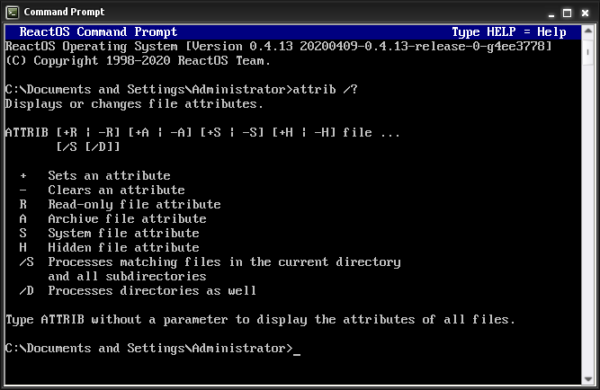
What Does the ATTRIB Command Do?, The ATTRIB command is a DOS command used to view and change file attributes.
File attributes control how files behave, such as whether a file is:
- Hidden
- Read-only
- System-protected
- Archived
ATTRIB is often used when:
- Files will not delete
- Files appear to be missing
- Access is denied unexpectedly
Basic ATTRIB Command Syntax
To view attributes of files in the current folder:
attrib
This lists files and shows their attributes using letters.
Understanding ATTRIB Output
You may see letters like these:
- R – Read-only
- H – Hidden
- S – System file
- A – Archive
Example output:
A  report.txt
R  locked.txt
H  secret.txt
Each letter explains why a file behaves differently.
Viewing Attributes of a Specific File
Example:
attrib report.txt
This shows only the attributes for report.txt.
Removing the Read-Only Attribute
If a file cannot be edited or deleted:
attrib -r filename
Example:
attrib -r locked.txt
This allows the file to be modified or deleted.
Showing Hidden Files
To remove the hidden attribute:
attrib -h filename
Example:
attrib -h secret.txt
This makes the file visible again.
Making a File Hidden
To hide a file:
attrib +h filename
Example:
attrib +h private.txt
This is commonly used for:
- Configuration files
- Sensitive data
- System files
Changing Attributes for Multiple Files
You can use wildcards.
Example:
attrib -r *.txt
This removes the read-only attribute from all text files.
⚠️ Always confirm with dir first.
Changing Attributes in Subfolders
To apply changes recursively:
attrib -r /s
This affects files in the current folder and all subfolders.
Use with care.
Common ATTRIB Command Problems
“Access is denied”
This means:
- The file is protected
- You lack permission
Try:
- Running Command Prompt as Administrator
File Still Does Not Delete
Check for:
- System attribute (
S) - File in use by another program
You may need:
attrib -r -h -s filename
Is the ATTRIB Command Safe?
ATTRIB is safe when used carefully.
Best practices:
- Change one attribute at a time
- Avoid modifying system files
- Always confirm file names
ATTRIB does not delete files on its own.
ATTRIB vs DEL (Important Difference)
- ATTRIB controls file behaviour
- DEL removes files
ATTRIB is often used before DEL.
When ATTRIB Is Commonly Used
ATTRIB is used when:
- Files appear missing
- Deletion fails
- Access errors occur
- Cleaning up old systems
- Fixing Windows repair issues
It is especially common in recovery environments.
What to Learn After ATTRIB
Next useful commands to learn:
CLS– clear the screenHELP– list available commandsEXIT– close Command Prompt
These improve usability and confidence.
Where to Go Next
Recommended next guides: