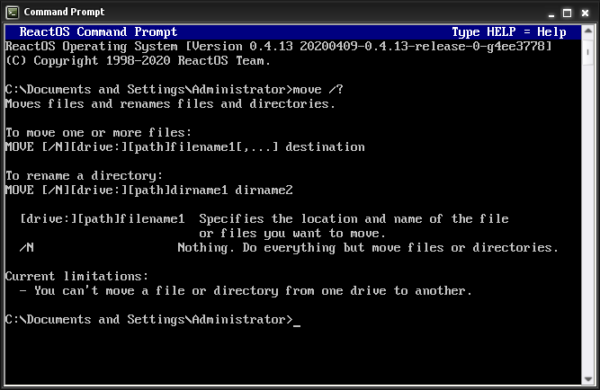
What Does the MOVE Command Do?, The MOVE command is a DOS command used to move files from one location to another.
Unlike COPY:
- MOVE removes the file from the original location
- The file exists only in the new location after the command completes
This makes MOVE useful for organising files and folders.
Basic MOVE Command Syntax
The basic structure is:
move source destination
Example:
move report.txt C:\Archive
This moves report.txt into the C:\Archive folder.
How to Use the MOVE Command (Step by Step)
Steps:
- Open Command Prompt
- Navigate to the folder containing the file
- Type:
move example.txt C:\Temp - Press Enter
You will see confirmation that the file was moved.
Moving and Renaming a File at the Same Time
You can rename a file while moving it.
Example:
move draft.txt final.txt
This:
- Renames the file
- Keeps it in the same folder
Or move and rename together:
move draft.txt C:\Reports\final.txt
Moving Files With Spaces in the Name
Always use quotation marks.
Example:
move "annual report.docx" "D:\Company Files\Reports"
Without quotes, the command will fail.
Moving Multiple Files at Once
Use wildcards.
Example:
move *.pdf C:\PDFs
This moves all PDF files from the current folder.
Moving Files Between Drives
MOVE works across drives.
Example:
move C:\Downloads\setup.exe D:\Installers
This is commonly used when organising:
- External drives
- USB storage
- Backup disks
Common MOVE Command Problems
“The system cannot find the file specified”
This usually means:
- The file name is incorrect
- You are in the wrong directory
Check with:
dir
“Access is denied”
This means:
- You lack permission
- The destination is protected
Try running Command Prompt as Administrator.
Is MOVE Safe to Use?
MOVE is safe if you know what you are moving.
Important to remember:
- The original file is removed
- There is no undo
If you are unsure, use COPY first, then delete later.
MOVE vs COPY (Quick Summary)
- COPY → duplicates files
- MOVE → relocates files
Use MOVE when you want to organise or clean up folders.
What to Learn After MOVE
Once you understand MOVE, the next command is critical:
DEL– delete files safely
DEL must be used carefully, so it is best learned after MOVE.
Where to Go Next
Recommended next guides: