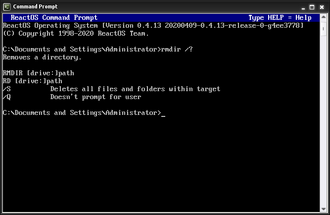
What Does the RD Command Do?, The RD command (short for Remove Directory) is a DOS command used to delete folders.
Important to understand:
- RD removes folders, not individual files
- By default, the folder must be empty
- It permanently removes the folder
You may also see this command called RMDIR — both work the same way.
Basic RD Command Syntax
The simplest form is:
rd foldername
Example:
rd OldReports
This removes the OldReports folder if it is empty.
How to Use the RD Command (Step by Step)
Steps:
- Open Command Prompt
- Navigate to the parent folder
- Type:
rd TestFolder - Press Enter
If the folder is empty, it is removed immediately.
Removing a Folder Using a Full Path
You do not need to be inside the folder.
Example:
rd C:\Temp\Logs
This removes the Logs folder directly.
Removing a Folder That Contains Files (Common Use)
To delete a folder and everything inside it, use:
rd /s foldername
Example:
rd /s OldBackups
Windows will ask for confirmation before proceeding.
Removing a Folder Without Confirmation (Use Carefully)
You can suppress confirmation prompts:
rd /s /q foldername
Example:
rd /s /q TempFiles
⚠️ This deletes the folder and all contents without asking.
Only use this when you are absolutely certain.
Removing Folders With Spaces in the Name
Use quotation marks.
Example:
rd "Old Project Files"
Without quotes, the command will fail.
Common RD Command Errors
“The directory is not empty”
This means:
- The folder contains files or subfolders
Solution:
rd /s foldername
“Access is denied”
This means:
- You do not have permission
- Files may be in use
Try:
- Closing any open files
- Running Command Prompt as Administrator
Is the RD Command Dangerous?
RD can be dangerous if misused, especially with /s and /q.
Best practices:
- Always run
dirfirst - Avoid
/quntil confident - Double-check folder names
- Never remove system folders
When in doubt, delete files individually first.
RD vs DEL (Important Difference)
- DEL deletes files
- RD deletes folders
You cannot delete folders with DEL alone.
What to Learn After RD
Once you understand RD, the next useful commands are:
TREE– view folder structuresATTRIB– view and change file attributesTYPE– read text files in CMD
These build confidence without high risk.
Where to Go Next
Recommended next guides: