How to Use Flipper Zero to Audit Your Home Security in 2026
The Flipper Zero has become one of the most useful home-learning tools for understanding wireless signals, smart devices, and how everyday technology communicates. In 2026, firmware improvements and safer scanning limits mean you can now use the Flipper Zero to carry out a simple, non-invasive home security audit. This guide explains what you can check, how to check it safely, and what the results mean for your home.
This post is designed for homeowners, renters, and beginners who want to understand their own equipment—not for accessing anything you do not own or have permission to test.
Why Use Flipper Zero for Home Security Audits
Home devices now rely heavily on wireless communication. Every doorbell, sensor, fob, and smart appliance emits signals that reveal:
How old the technology is
Whether it uses basic or encrypted communication
Where vulnerabilities may exist
How easy it is to accidentally interfere with the device
The Flipper Zero helps you identify these signals so you can make informed decisions about upgrades.
Step 1: Check Your Smart Doorbell or Cameras
Modern video doorbells and cameras usually broadcast low-energy wireless beacons. Using the Flipper’s Bluetooth scan, you can identify whether your doorbell:
Uses modern encrypted communication
Broadcasts excessively (battery drain)
Uses older 433MHz signals instead of newer standards
The Flipper doesn’t interact with cameras—it only shows public broadcast information. If your camera uses older RF frequencies, it may be worth upgrading for better encryption and reliability.
Step 2: Analyse Your Wireless Alarm Sensors
If you own a home alarm system, the sensors often use Sub-GHz signals to communicate. Many older sensors broadcast predictable, unencrypted packets that are easier to detect.
Using the Sub-GHz scanner, you can check:
Is the sensor active?
What frequency does it use?
Does it appear to broadcast securely or openly?
The Flipper cannot decode secure alarms, but seeing unencrypted or repetitive signals may indicate outdated equipment.
Step 3: Test Your Remote Controls
Most homes have remote controls for:
TVs
Projectors
Air conditioning units
Garage or gate openers (your own devices only)
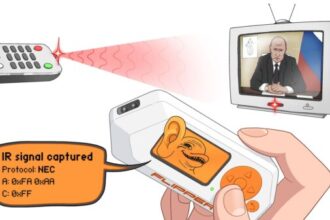
The Flipper’s infrared and Sub-GHz tools allow you to identify:
If the remote uses IR or RF
Whether the RF signal is a fixed code or modern rolling code
If the IR signal can be stored (for devices you own)
This information helps you determine whether your remotes use outdated technology that could be replaced with more secure options.
Step 4: Scan Your Smart Home Sensors
Smart thermostats, lighting systems, heating controls, and energy monitors often use NFC, Sub-GHz, or BLE.
Using the Flipper Zero, you can check:
Presence of BLE beacons
Signal strength
Frequency ranges
Whether the device uses “pairing mode only” broadcasts
Some older smart home sensors constantly broadcast unnecessary data. The Flipper Zero helps you identify these noisy devices, which may indicate weak security or poor battery optimisation.
Step 5: Check Any Key Fobs You Personally Own
Household key fobs can include:
RFID fobs for gym lockers
Building access tags (your own)
Gate remotes
Smart padlock keys
Using the RFID/NFC tools, you can determine:
What type of tag you have
Whether the tag is using outdated technology
If the tag is easily cloneable (only applicable to tags you own)
If you find that your fob uses simple 125 kHz technology, it may be worth upgrading to a secure, modern system if your supplier offers one.
Step 6: Evaluate Your Home Network Setup
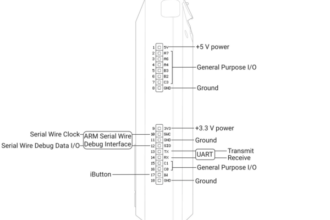
Although Flipper Zero cannot interact with Wi-Fi networks, the Wi-Fi Dev Board (optional accessory) helps you:
Identify your router’s broadcasting channels
See if your home has unnecessary Wi-Fi noise
Check whether your access point uses modern standards
This information can help you determine if your router is outdated or requires reconfiguration.
Step 7: Review Findings and Make Improvements
Once you’ve scanned your home, you may discover devices that:
Use old frequencies
Broadcast constantly
Show predictable signals
Operate on outdated security standards
Common upgrades include:
Replacing old Sub-GHz alarm sensors
Upgrading smart plugs
Switching to modern NFC-enabled locks
Installing a more secure smart doorbell
Replacing outdated garage remotes
The Flipper Zero doesn’t fix these issues—but it highlights them so you can take action.
What the Flipper Zero Cannot Audit
It cannot check:
Wi-Fi passwords
Encrypted systems
Car keys
Payment systems
Secure NFC cards
The Flipper Zero only provides visibility into publicly available broadcasts and basic signal analysis.
Final Thoughts
Using the Flipper Zero to audit your home security in 2026 is one of the most practical and educational ways to understand your own wireless environment. You don’t need technical expertise—just curiosity. By scanning your own devices, you can identify outdated technologies, reduce unnecessary signal broadcasts, and improve your home’s overall security posture.