RFID Security in 2026: How Flipper Zero Helps You Identify Weak Cards
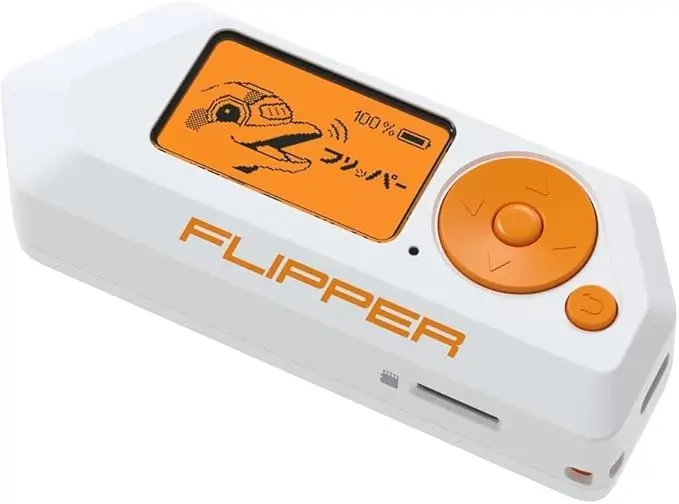
RFID technology is used everywhere—offices, gyms, storage units, housing blocks, and smart access systems. But not all RFID cards are equal. Some use outdated, easily readable technology, while others use modern, highly secure encryption. In 2026, the Flipper Zero has become a useful tool for identifying the type of RFID card you own and assessing whether it uses old or modern standards.
This guide explains how RFID security has changed by 2026, how the Flipper Zero helps you understand your own cards, and what steps you can take to protect your security.
What Has Changed in RFID Security by 2026
Older systems still use 125 kHz low-frequency tags (EM4100, HID Prox, T5577). These cards often:
Lack encryption
Broadcast predictable ID numbers
Can be easily copied (if you own the card)
Have short reading ranges
Are widely deployed but outdated
Modern systems now use:
High-frequency smart cards (13.56 MHz)
Encrypted tags
Rolling or challenge-response systems
Secure card readers with tamper detection
The gap between old and new technology has never been wider, making it more important to understand what type of card you have.
How the Flipper Zero Helps You Identify Your RFID Card Type
When scanning an RFID card you own, the Flipper Zero will immediately display:
The frequency (125 kHz or 13.56 MHz)
The card technology (EM4100, HID Prox, Mifare, etc.)
A basic description of the tag
Whether it is read-only or re-writable
This information alone is enough to determine whether your RFID card is using outdated technology.
For example:
If the Flipper identifies a 125 kHz EM4100 tag, that is a clear sign the system is old and not secure by modern standards.
What the Flipper Zero Can Do Safely
The device can:
Scan your own RFID cards
Identify card type and format
Detect whether the card uses basic or modern technology
Read publicly accessible tag data
Help you spot outdated, insecure systems you have permission to review
It cannot:
Bypass encryption
Read private or secure data
Gain access to systems
Clone cards unless the system allows it and you own the card
The Flipper Zero is strictly a learning and testing tool.
Signs Your RFID Card Is Outdated or Weak
If your card appears in one of these categories, it likely needs upgrading:
It is a 125 kHz EM4100/EM4102 tag
It is a basic HID Prox card
It has no encryption indication
It can be read instantly without authentication
It shows a simple ID number in the Flipper scan
It works with very old access readers
These cards are convenient but not reliable for high-security environments.
What a Modern, More Secure RFID Card Looks Like
Secure cards typically fall under:
MIFARE DESFire EV2 or EV3
MIFARE Plus
NTAG-based encrypted systems
iClass SE
FIDO-compatible access cards
When scanning these cards, the Flipper Zero will show limited readable data or display the card type without revealing anything sensitive. This is normal and indicates secure encryption.
How to Scan an RFID Card with Flipper Zero
To identify your card:
Open RFID menu
Select Read
Place your card on the back of the Flipper
Wait for the reading to complete
The Flipper will display the tag technology and any publicly accessible data.
This allows you to understand your card’s security level without extracting any protected information.
Why Identifying Weak Cards Matters in 2026
Many organisations continue using outdated RFID cards because they are cheap and have been deployed for years. However, weak cards can result in:
Unauthorised entry risks
Reduced access control reliability
Easier duplication of ID numbers
Poor tracking or access logs
Incompatibility with modern readers
If your card uses old technology, it may be worth asking your provider or building management whether a secure upgrade is planned.
What to Do If Your RFID Card Is Weak
If the Flipper Zero identifies your card as old or insecure, the next steps depend on who manages your system:
For personal systems (garage, home access):
Consider upgrading to a secure NFC or smart card solution.
For workplace systems:
Report your findings to IT or facilities teams for review.
For building access (if you are a tenant):
Inform property management that the system uses outdated 125 kHz technology.
You are not modifying or accessing anything—simply identifying the card’s technology level.
Final Thoughts
RFID security in 2026 varies widely, and many older systems remain in place. Using the Flipper Zero, you can quickly determine whether your own card uses outdated technology or a modern, secure standard. This empowers you to make informed decisions about upgrades, personal safety, and access reliability—all without interacting with systems you don’t own.