What this does
Test if a Network Port Is Open, This PowerShell command checks whether a specific network port is reachable on a remote device. It helps confirm if a service is accessible or being blocked by a firewall.
When you’d use this
- An application cannot connect to a server
- You need to confirm a service is listening
- Firewall or network rules are suspected
- Before escalating a connectivity issue
PowerShell command (copy and paste)
Test-NetConnection google.com -Port 443
Replace:
google.comwith the server or device name443with the port you want to test
What the output means
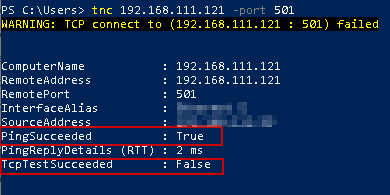
- TcpTestSucceeded : True – the port is open and reachable
- TcpTestSucceeded : False – the port is blocked or unreachable
Other useful fields include:
- RemoteAddress – the resolved IP address
- PingSucceeded – whether the host responded to ping
Common mistakes to avoid
- Testing the wrong port number
- Forgetting VPNs can change routing
- Assuming a failed test always means a firewall issue
Efficiency tip (skip ping, test port only)
Test-NetConnection servername -Port 3389 -InformationLevel Quiet
This returns a simple True or False, ideal for quick checks or scripts.
Why this improves efficiency
- Faster than installing third-party tools
- Built into Windows
- Clear, unambiguous results
- Ideal for remote troubleshooting