
Skip to content
Hot News

MSI Prestige AI Evo — Full Review & Buyer’s Guide

Samsung Galaxy Book 5 Ultra — Full Review & Buyer’s Guide

What Does the MOVE Command Do?

What Does the DEL Command Do?

What Does the MD Command Do?

What Does the RD Command Do?

Serverman | Tech Reviews | How-To Guides

Practical IT, Cybersecurity & AI — Explained Clearly

  • 2-in-1 Laptops44 products
  • Backup Drives11 product
  • Cable Tidy11 product
  • CPU'S55 products
  • Draytek Vigor88 products
  • Flipper Zero44 products
  • Keyboard & Mouse44 products
  • Laptops11 product
  • Monitors - TFT22 products
  • PC - Workstations11 product
  • PC Cases88 products
  • Plaud Note11 product
  • Remarkable55 products
  • Samsung Galaxy Watch 6 Classic22 products
  • Slip Printer11 product
  • Thermal Paste11 product
  • UPS - Uninterruptible Power Supply33 products
  • USB C Power Supply22 products
  • Yubico33 products
  • CyberSecurity Products22 products
  • Recommended CyberSecurity Books1010 products
  • Home
    • Shop
      • All Products
      • Welcome to the shopping Cart
      • Checkout
      • My account
    • Forum
      • Login to Our Discussion Community
      • New Topic
    • Contact Us
      • Privacy Policy
      • Cookie Policy (UK)
      • Affiliate Disclosure
    • Cookie Policy (EU)
  • Everything Hardware
    • Everything Keyboard and Mouse
    • Everything ReMarkable
    • Everything Plaud Note
    • Everything Flipper Zero
    • Everything YubiKey
    • Everything Laptops
    • Everything PC Case
    • Everything Anker
    • Everything Support
      • Business Support Plans
      • Fix Your Home Computer: Expert Help for £99.99
    • Everything CPU
    • Everything Hardware How To
      • Everything PowerShell
      • Everything DOS
  • Everything Server
    • Everything NAS
    • Windows Server End of Life
  • Everything Cyber Security
    • Everything Virus & Malware
  • Everything Artificial Intelligence
    • AI in Business
    • AI for Builders Merchants
    • AI for Electrical Wholesalers
    • AI For Wholesale Distribution
    • Everything AI How To
  • Everything Web Hosting
  • Everything VPN
    • VPN Comparisons
    • How VPNs Work
    • Does a VPN Really make you anonymous
  • Everything Crypto
  • Site Map
Friday, January 9, 2026
Home / Everything Hardware / Everything YubiKey / The Ultimate YubiKey 5 NFC
  • Everything Hardware
  • Everything YubiKey

The Ultimate YubiKey 5 NFC

Yubikey 5 NFC

The Simple Security Key That Protects Your Online Accounts
  • Why I Love My YubiKey 5 NFC
  • What is the YubiKey 5 NFC?
  • Why It's Worth Considering
    • 1. Simple to Use
    • 2. Works with Many Popular Services
    • 3. No Batteries Required
    • 4. Extremely Durable
    • stuartstafford_0kho9jyw
  • My Daily Experience
  • Who Would Benefit Most from a YubiKey?
  • Tips for New Users
  • Is It Worth the Investment?
  • Final Thoughts
Yubikey 5 NFC

Why I Love My YubiKey 5 NFC

After trying various security methods to protect my online accounts, I’ve found the YubiKey 5 NFC to be the most reliable and user-friendly option. This small device has become an essential part of my daily digital security routine, and I wanted to share my experience with it.

What is the YubiKey 5 NFC?

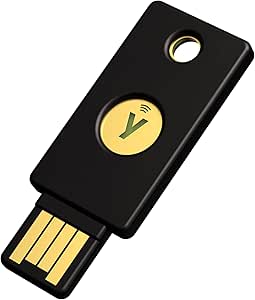
The YubiKey 5 NFC is a small security key that fits on your keychain. It has a USB-A connector (the standard USB port found on most computers) and also supports NFC (Near Field Communication), which lets you tap it against smartphones for wireless connection.

Think of it as a physical key for your online accounts. When logging in, instead of just relying on a password that could be stolen or guessed, you also need this physical key – adding a powerful layer of security.

Why It’s Worth Considering

1. Simple to Use

Using the YubiKey is straightforward: when logging into websites, you insert it into your computer’s USB port (or tap it against your phone) and touch the gold circle. That’s it! No complicated passwords to remember or codes to type in.

2. Works with Many Popular Services

The YubiKey works with hundreds of websites and apps including:

  • Google accounts
  • Microsoft accounts
  • Facebook
  • Twitter
  • Dropbox
  • Password managers like LastPass and 1Password
  • And many more

3. No Batteries Required

Unlike other security options, the YubiKey doesn’t need charging or batteries. It draws tiny amounts of power from your device only when in use.

4. Extremely Durable

I’ve had mine on my keychain for months, and despite drops, scratches, and even a trip through the washing machine, it still works perfectly. It’s waterproof and has no moving parts to break.

5. No Need for Phone Signal

Unlike text message codes or authenticator apps, the YubiKey works without a phone signal or internet connection on your phone.

My Daily Experience

When I first got my YubiKey, I set it up with my most important accounts – email, cloud storage, and social media. The setup process was simple: I went to the security settings of each account, selected the option to add a security key, and followed the prompts.

Now, when I log into these accounts, I enter my password as usual, then insert my YubiKey when prompted and touch the gold circle. This takes just a second but makes my accounts significantly more secure.

For my phone, I simply tap the YubiKey against the back of my phone (where the NFC reader is located) when prompted during login.

What I appreciate most is the peace of mind. Even if someone somehow got my password, they still couldn’t access my accounts without my physical YubiKey.

Who Would Benefit Most from a YubiKey?

The YubiKey 5 NFC is especially valuable for:

  • People who want stronger security without complication
  • Anyone who has experienced account hacking in the past
  • Those who manage sensitive information for work
  • People who use public Wi-Fi frequently
  • Anyone tired of dealing with text message codes or authenticator apps

Tips for New Users

If you decide to try a YubiKey, here are some helpful tips:

  1. Register at least two security keys with your most important accounts (keep one as a backup in a safe place)
  2. Start with your email account first, since email is often the recovery method for other accounts
  3. Check compatibility before purchasing to ensure it works with your devices
  4. Keep it on your keychain so you always have it available
  5. Set up backup methods such as recovery codes (stored securely offline)

Is It Worth the Investment?

At around £45-50, the YubiKey 5 NFC might seem expensive compared to free authentication apps. However, considering the enhanced security, convenience, and durability, I’ve found it well worth the investment.

When I think about the potential cost and hassle of a hacked account – lost data, identity theft, or financial fraud – the price seems quite reasonable for the protection it provides.

Final Thoughts

In today’s world of constant data breaches and sophisticated phishing attacks, having strong security for your online accounts isn’t just for tech experts – it’s for everyone. The YubiKey 5 NFC offers robust protection in a simple, reliable package that doesn’t require technical expertise to use.

What impresses me most is how it manages to make top-level security accessible to regular users. If you’re looking to meaningfully upgrade your online security without adding daily hassle, the YubiKey 5 NFC deserves your consideration.

Have you tried a physical security key? I’d love to hear about your experience in the comments!

Yubico - YubiKey 5 NFC - Two-factor authentication security key, fits USB-A ports and works with NFC supported mobile devices

Yubico – YubiKey 5 NFC – Two-factor authentication security key, fits USB-A ports and works with NFC supported mobile devices

  • Security key: Protect your online accounts by two-factor authentication with the Yubico YubiKey 5 NFC security key – the most effective USB security key in the world that supports more Internet services and apps than any other – from unauthorized access.
  • FIDO: The YubiKey 5 NFC is FIDO certified and supports Google Chrome as well as any other FIDO-compliant application o…
£49.90
Shop now

YubiKey 5C Nano Review

YubiKey 5 NFC

YubiKey 5Ci Review

Tagged:2 step verification yubikey 5 nfc androiddelete yubikey 5 nfc from your accounthow to use yubikey 5 nfctwo-factor authentication yubikey 5 nfc iphoneuse yubikey 5 nfc security key with iphone & androidyubico yubikey 5 nfcyubico yubikey 5c nfcyubikey 5 nfcyubikey 5 nfc for online protectionyubikey 5 nfc how to useyubikey 5 nfc iphoneyubikey 5 nfc reviewyubikey 5 nfc setupyubikey 5c nfcyubikey 5c nfc reviewyubikey nfcyubikey security key nfcyubikey security key nfc vs yubikey 5
Previous Article
Yubikey 5c nano

Why the YubiKey 5C Nano is the best security key for 2025

Next Article

Is the Flipper Zero WiFi Devboard Worth It? Full Pros & Cons

flpper zero wifi card
admin

Related Posts

What to Buy for Christmas 2025
What to Buy for Christmas 2025: A Simple Tech Gift Guide That Act ...
voxi mobile review
VOXI Mobile Review: VOXI used for Over Two Years
Dell Pro Slim QCS1250
Dell Pro Slim QCS1250 – Direct Replacement

Newsletter

Stay updated with our weekly newsletter. Subscribe now to never miss an update!

    • Affiliate Disclosure
    • Checkout
    • Contact Us
    • Cookie Policy (EU)
    • Cookie Policy (UK)
    • Fix Your Home Computer: Expert Help for £99.99
    • My account
    • Privacy Policy
    • Shop
    • Site Map
    • Topics
      • Login to Our Discussion Community
      • New Topic
    • Welcome to the shopping Cart
    Copyright Serverman.co.uk © 2026 Serverman | Tech Reviews | How-To Guides | Powered by News Magazine X