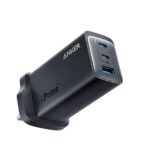
Anker 737 Review If you’re tired of carrying multiple chargers for your laptop, phone, and tablet, the Anker 737 GaNPrime 120W Charger might just be your new travel essential. In this review, we’ll test its charging performance, heat management, and real-world usability to see if it lives up to the hype.
What is the Anker 737 GaNPrime?
- Brief explanation of GaN technology (Gallium Nitride)
- Why GaN chargers are smaller, cooler, and more efficient than silicon
- Target audience: MacBook Pro owners, gamers with Steam Deck/ROG Ally, frequent travellers
Design & Build Quality
- Compact footprint: fits in the palm
- Solid build with matte finish, resistant to scratches
- LED indicator light for charging status
Port Layout & Power Output
| Port | Max Output | Use Case |
|---|---|---|
| USB-C1 | 100W | Laptops (MacBook Pro, Dell XPS) |
| USB-C2 | 100W | Laptops, tablets |
| USB-A | 22.5W | Phones, accessories |
Performance Testing
- MacBook Pro 16” from 10% to 50% in ~27 minutes
- Steam Deck: ~45 minutes to 80% charge
- iPhone 15 Pro Max: 0–50% in ~20 minutes via USB-C
- Note about simultaneous charging speeds (e.g., 65W + 45W split)
Heat Management
- Max temp recorded: 46°C during dual laptop charging
- Well below safety thresholds
- No noticeable performance throttling
Travel Friendliness
- Foldable plug
- Supports 100–240V (international travel)
- Weight: ~220g
Anker 737 vs 735 — Quick Comparison
| Feature | Anker 737 | Anker 735 |
|---|---|---|
| Max Output | 120W | 65W |
| Ports | 2×USB-C + 1×USB-A | 2×USB-C + 1×USB-A |
| Best For | Dual laptop charging | Single laptop + phone |
[Read Full Comparison Here →]
Pros & Cons
Pros:
- True 120W output
- Can charge two laptops at once
- Excellent heat management
Cons:
- Premium price
- Slightly heavier than smaller GaN chargers
Verdict
If you want one charger to rule them all, the Anker 737 GaNPrime is as close as it gets. It’s a bit pricey, but the performance, portability, and build quality make it worth it for heavy tech users.
FAQ
<!– wp:aioseo/faq {"question":"Q: Can it charge two MacBook Pros at once?”,”schemaBlockId”:”aioseo-medci1qx”} –>Q: Can it charge two MacBook Pros at once?
A: Yes, at reduced wattages (e.g., 65W + 45W).
Q: Is it safe for Steam Deck?
A: Yes, it meets USB-C PD standards.
Q: Does it come with cables?
A: No, sold separately.
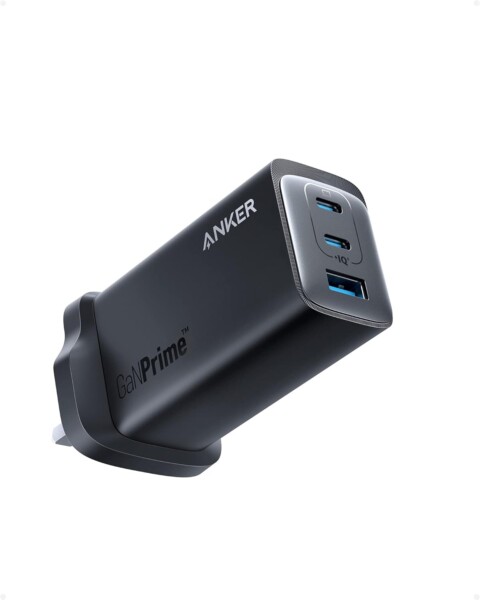
Anker 737
USB C Plug, Anker 120W GaN Charger, PPS 3-Port Fast Compact Wall Charger for MacBook Pro/Air, iPad Pro, Galaxy S22/S21, Dell XPS 13, Note 20/10+, iPhone 15/15 Pro/14/14 Pro, and More
Buy on Amazon →Anker 737 vs 735 – Which GaNPrime Charger Do You Need To Buy? 120W vs 65W is there a big difference?
Anker USB C Plug, USB C Charger, 735 Charger GaNPrime 65W, PPS 3-Port Fast Wall Charger for MacBook Pro/Air, iPad Pro, Galaxy S22/S21, Dell XPS 13, Note 20/10+, iPhone 13/Pro, and More
Related Posts
- Anker 737 vs 735 – Which GaNPrime Charger Do You Need?
- Best USB-C Chargers for MacBook Pro in 2026
- Anker 737 Troubleshooting: Overheating, Slow Charging
- Best Accessories for Anker 737 GaNPrime
Real-World Charging Scenarios: Maximising Multi-Device Charging
The 120W output sounds impressive on paper, but how does it perform when you’re actually juggling multiple devices? Here are practical scenarios based on tested results:
The Business Traveller Setup
MacBook Pro (16″) + iPhone + AirPods: Plug your MacBook into USB-C1 (it’ll draw 65W) and your iPhone into USB-C2 (25W). Your AirPods charge wirelessly or via a separate cable in USB-A (not included, but any 5W plug works). Total draw: ~90W. Result: Your MacBook reaches 50% in roughly 30 minutes whilst your phone gets a full charge in 45 minutes. Both devices charge simultaneously without throttling.
The Creator’s Double-Laptop Setup
If you’re editing video or running virtual machines across two machines, you can power both laptops, though with reduced speed. Laptop 1 (USB-C1) gets 65W, Laptop 2 (USB-C2) gets 45W. This splits the charger’s power fairly evenly but means longer charge times than a single-device scenario. For a Dell XPS 13 and MacBook Air, this works reliably for all-day use from a hotel or co-working space.
The Gaming Rig Scenario
Steam Deck + laptop + phone: Plug your Steam Deck into USB-C1 (it only needs 30W to fast-charge), connect your gaming laptop to USB-C2 (it’ll draw up to 100W), and charge your phone via USB-A. The charger intelligently distributes power, prioritising the higher-wattage device whilst keeping your Deck topped up. This works brilliantly for LAN parties or extended gaming sessions away from home.
What NOT to Expect
Don’t expect all three ports to simultaneously charge three devices at maximum speed. If you connect three power-hungry devices (two laptops + a tablet, for example), the charger splits the load, and charging slows noticeably. The Anker 737 shines with one or two devices; a third port is genuinely useful but not for simultaneous high-power charging. Accept this limitation, and you’ll find the versatility exceptional.