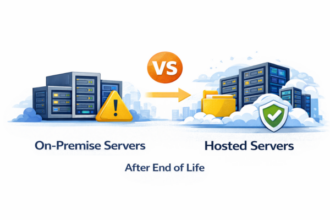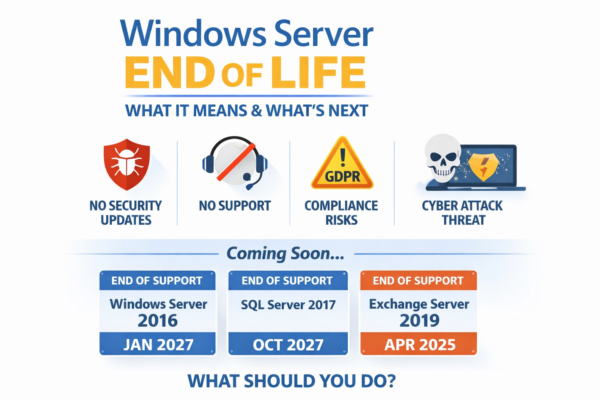
Windows Server End of Life, If your business runs Windows Server, understanding End of Life (EOL) dates is critical. Once a server operating system reaches end of life, it no longer receives security updates, bug fixes, or technical support. This creates serious security, compliance, and business continuity risks.
This guide explains:
- What Windows Server End of Life really means
- Which Windows Server versions are already expired
- What is expiring next
- What other Microsoft server products you should be planning for
- The safest options going forward
What Does “Windows Server End of Life” Mean?
When Microsoft declares a server product End of Life, the following happens:
- No more security patches
- No bug fixes or performance updates
- No official Microsoft support
- Increased risk of ransomware and data breaches
- Potential compliance failures (GDPR, Cyber Essentials, ISO 27001)
In short, an EOL server becomes a liability, not an asset.
Windows Server Versions That Are Already End of Life
The following versions should no longer be in production use:
- Windows Server 2008 / 2008 R2
- Windows Server 2012
- Windows Server 2012 R2
Any business still running these versions is exposed to known, unpatched vulnerabilities that attackers actively exploit.
Current and Upcoming Windows Server End of Life Dates
These are the versions most businesses are still running today.
Windows Server 2016
- End of Mainstream Support: January 2022
- End of Extended Support: January 2027
This means:
- No feature updates
- Security updates only until 2027
- Planning should already be underway
Windows Server 2019
- End of Mainstream Support: January 2024
- End of Extended Support: January 2029
This is currently a safe platform, but it should still be part of a longer-term refresh strategy.
Windows Server 2022
- End of Mainstream Support: October 2026
- End of Extended Support: October 2031
This is the recommended baseline for new deployments today.
It’s Not Just Windows Server: Other Server Products Expiring
Many businesses focus only on Windows Server itself, but several critical server components also have life cycles.
SQL Server End of Life
Commonly impacted versions:
- SQL Server 2012 – End of Life
- SQL Server 2014 – End of Life
- SQL Server 2016 – Extended support ends 2026
- SQL Server 2017 – Extended support ends 2027
Running an unsupported SQL Server puts ERP systems, finance data, and customer records at risk.
Remote Desktop Services (Terminal Services)
RDS is tied directly to Windows Server versions.
If the underlying server OS is end of life:
- RDS becomes unsupported
- Security risks increase significantly
- Performance and licensing issues become harder to resolve
This is particularly important for businesses using ERP, accounts, or line-of-business applications via Terminal Services.
Exchange Server (On-Prem)
If you still operate on-prem Exchange:
- Exchange 2013 – End of Life
- Exchange 2016 – End of Life expected 2025
- Exchange 2019 – End of Life expected 2025
This is one of the strongest drivers pushing businesses toward hosted email platforms.
Why Businesses Delay (and Why That’s Risky)
Common reasons upgrades get postponed:
- “It still works”
- Fear of downtime
- Budget constraints
- Legacy applications
- Unclear upgrade path
Unfortunately, attackers specifically target older, stable-but-unsupported systems because they know patches will never arrive.
What Are Your Options When a Server Is Near End of Life?
There are typically four realistic paths.
Option 1: Upgrade the Existing Server
- Suitable for modern hardware
- Often limited by age or performance
- Short-term fix
Option 2: Replace the Server Hardware
- Higher upfront cost
- Long-term stability
- Still requires on-site management
Option 3: Move to Hosted / Private Cloud Servers
- Dedicated virtual machines
- Enterprise-grade hardware
- Predictable monthly costs
- Easier upgrades going forward
This option is increasingly popular for:
- ERP systems
- SQL databases
- Terminal Services environments
Option 4: Do Nothing (Not Recommended)
- Increasing security exposure
- Rising insurance and compliance risk
- Higher long-term costs after a breach
Planning for the Future: Avoiding the Next End of Life Panic
A modern server strategy should aim to:
- Stay within supported life cycles
- Reduce reliance on ageing hardware
- Separate applications from physical infrastructure
- Make future upgrades simpler and predictable
Hosted and virtualised environments allow:
- Faster OS upgrades
- Easier testing
- Less disruption to users
How Often Should You Review Server Life Cycles?
As a minimum:
- Review server OS versions annually
- Maintain a rolling 3–5 year infrastructure roadmap
- Track Windows Server, SQL Server, and application dependencies together
Final Thoughts
Windows Server End of Life is not just an IT issue it is a business risk.
The cost of proactive planning is always lower than the cost of a security incident, forced outage, or emergency migration.
If your servers are approaching end of life, the best time to plan was last year.
The second-best time is now.